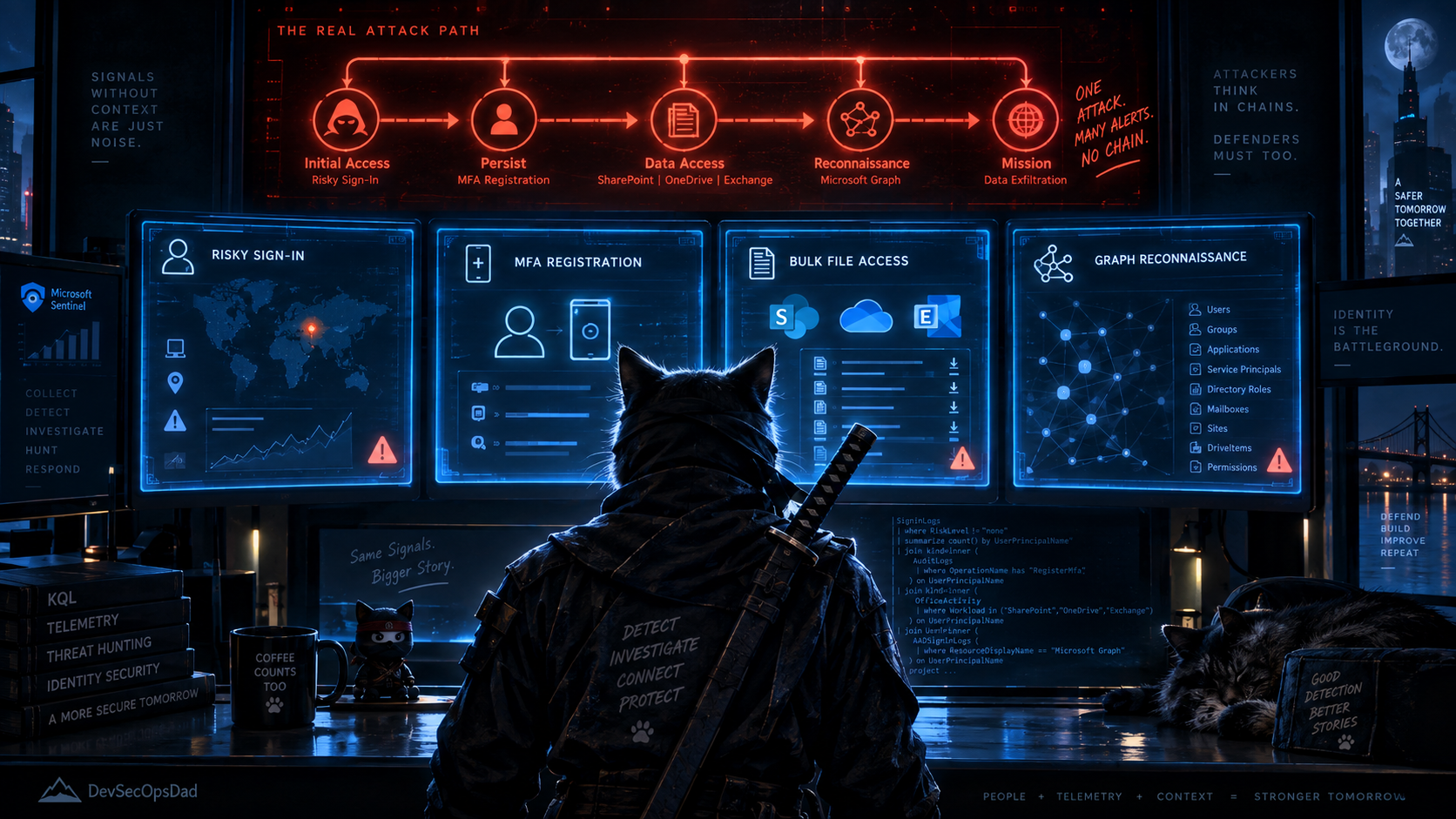
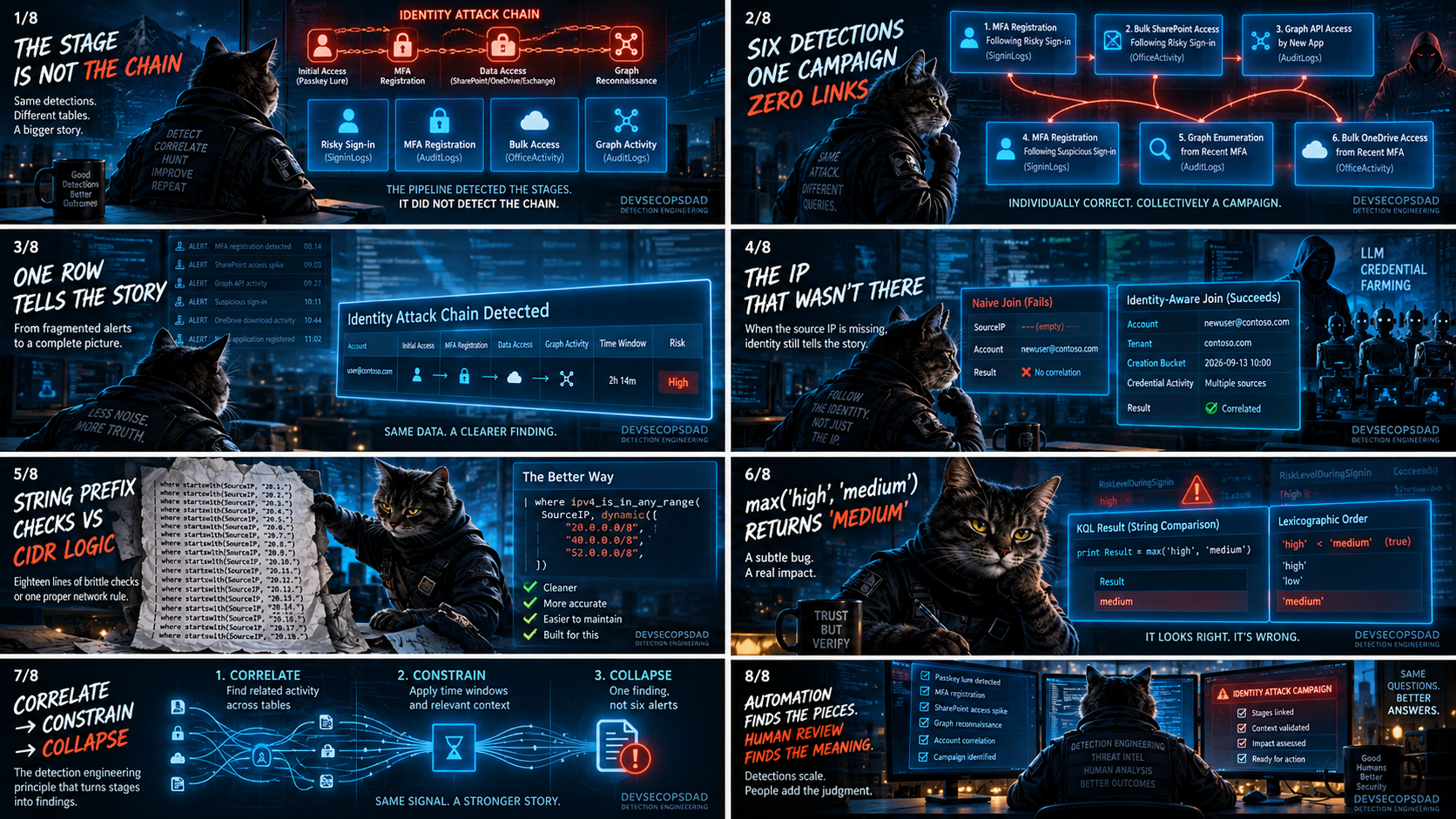
Last week the DevSecOpsDadAttack Detection Engineering pipeline (run on a Raspberry Pi) produced thirty-two detections across seven days, and the most interesting cluster wasn’t a single query — it was the gap between six of them. Microsoft’s passkey-themed social engineering reporting describes a single campaign: compromise identity via passkey lure, register an MFA method for persistence, access SharePoint/OneDrive/Exchange at volume, abuse Microsoft Graph for reconnaissance. The pipeline correctly identified every stage. Thursday correlated each one against a risky sign-in. Friday correlated each one against a recent MFA registration. Five production candidates and one hunting-only query, all solid individually — and not one of them links to any other. The pipeline detected the stages. It did not detect the chain.
This matters because the analyst deploying all six gets six separate alerts for the same incident. The MFA registration fires first; the bulk-access alert fires an hour later; the Graph recon alert fires an hour after that. None of them say “this is the same attack.” And the analyst who only deploys one — the MFA registration, because it was marked production-ready — never sees that the account went on to download two thousand SharePoint documents, because that alert lives in a different query on a different table with a different schedule. The chain is the finding; the stage is just a waypoint.
Act I is the identity attack chain and the composite query that links the stages. Act II is Sunday’s LLM credential farming detection, where the SourceIP extraction pulls from the wrong field and the join assumes the newly created account acts under its own UPN. The honorable mention is Saturday’s Metasploit detection, where eighteen lines of string-prefix checks do what ipv4_is_in_any_range() and an explicit CIDR list do in two. And the bonus round is a KQL mechanic hiding in all six Act I source queries — max() on a string like RiskLevelDuringSignIn returns the lexicographic maximum, which means 'medium' beats 'high', and the analyst sees the wrong severity.
🥇 Act I: Six Detections, One Campaign, Zero Links
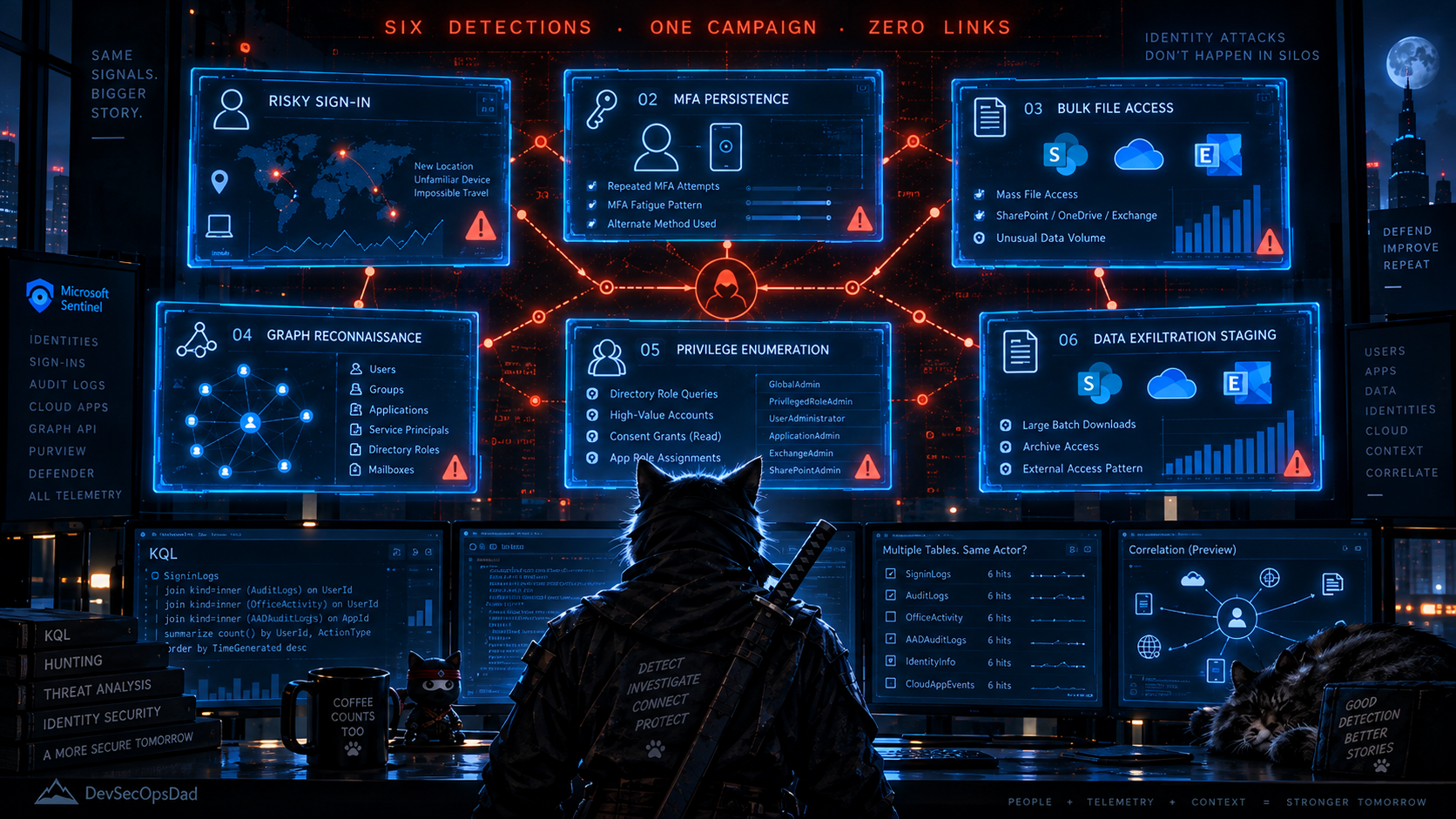
Microsoft’s passkey-themed social engineering blog landed on Tuesday and the pipeline responded across Thursday and Friday with six detections that trace the same campaign’s kill chain:
Thursday — correlated against a risky sign-in:
- Detection 1: MFA Method Registration Following Risky Sign-In (production candidate)
- Detection 2: Bulk SharePoint and OneDrive Access Following Risky Sign-In (production candidate)
- Detection 3: Microsoft Graph API Access by Newly Registered Application Following Account Compromise (production candidate)
Friday — correlated against a recent MFA registration:
- Detection 1: MFA Method Registration Following Suspicious Sign-In (production candidate)
- Detection 2: Microsoft Graph Enumeration Operations from Recently MFA-Registered Account (hunting-only)
- Detection 3: Bulk SharePoint and OneDrive Access from Account with Recent MFA Registration (production candidate)
Six queries, two days, three tables — SigninLogs, AuditLogs, OfficeActivity — and every single one stands alone. Each correlates its stage against exactly one anchor: either a risky sign-in or an MFA registration. None of them correlates with any other stage.
Before taking them apart, a note on what the attack is, because the chain structure matters for understanding why the detections miss the point. The campaign the Microsoft blog describes works like this: an attacker sends a passkey-themed social engineering lure (a fake “enroll your new security key” email). The victim authenticates against a phishing page, which harvests credentials. The attacker immediately signs in with those credentials — this is the risky sign-in — and registers a new MFA method (an authenticator app, a phone number, a passkey) so they retain access even after the password gets reset. Now persistent, the attacker accesses SharePoint, OneDrive, and Exchange at volume — staging or exfiltrating data. And then they register or repurpose an Entra application and use it to call the Microsoft Graph API for reconnaissance: enumerating users, groups, directory objects, and service principals.
That is four stages, in order, with the MFA registration enabling everything downstream. Data exfiltration and Graph reconnaissance run in parallel after persistence — a DAG, not a pipeline. Now, each individual query — I will pick one per stage, since the Thursday and Friday variants are structurally identical.
Thursday Detection 1 — MFA Registration:
let RiskySignIns = SigninLogs
| where TimeGenerated > ago(2d)
| where RiskLevelDuringSignIn in ('high', 'medium')
    or ResultType !in (KnownGoodResultTypes)
| summarize
    SignInTime = max(TimeGenerated),
    RiskLevel = max(RiskLevelDuringSignIn),
    SignInIP = max(IPAddress)
    by UserPrincipalName;
AuditLogs
| where OperationName in (MFAOperations)
| join kind=inner ( RiskySignIns ) on UPN
| where TimeGenerated between (SignInTime .. (SignInTime + 60m))
This finds MFA registrations that happen within 60 minutes of a risky sign-in. It is a good query for its stated purpose. What it does not do is carry the MFA registration event forward as an anchor for the next stage. The analyst sees “risky sign-in → MFA registration” and the trail ends. If the same account goes on to download every file in the CFO’s OneDrive twenty minutes later, that shows up as a separate alert from a separate query — Thursday Detection 2 — and nothing links the two.
Thursday Detection 2 — Bulk Data Access:
let RiskySignIns = SigninLogs
| where TimeGenerated > ago(2d)
| where RiskLevelDuringSignIn in ('high', 'medium')
| summarize
    SignInTime = max(TimeGenerated),
    SignInIP = max(IPAddress),
    RiskLevelDuringSignIn = max(RiskLevelDuringSignIn)
    by UserPrincipalName;
let BulkAccess = OfficeActivity
| where Operation in (TargetOperations)
| summarize AccessCount = count(), ...
    by JoinKey, UserId, bin(TimeGenerated, 30m)
| where AccessCount >= 50;
BulkAccess
| join kind=inner RiskySignIns on JoinKey
| where EarliestAccessTime between (SignInTime .. (SignInTime + 2h))
Same anchor — risky sign-in — different stage. The analyst now knows this user did a bulk download within two hours of the risky sign-in, but the query doesn’t ask “did this user also register an MFA method between the sign-in and the download?” That question matters: an account that was compromised AND established persistence AND exfiltrated data is at a categorically different severity than one that just had a risky sign-in followed by a bulk download (which could be a legitimate user who trips a risk heuristic and then does their job). The MFA registration in between is the persistence signal that turns a suspicious correlation into a probable compromise.
Thursday Detection 3 — Graph API Abuse:
let NewApps = AuditLogs
| where OperationName in ('Add application', 'Add service principal')
| ...;
let RiskySignIns = SigninLogs
| where RiskLevelDuringSignIn in ('high', 'medium')
| ...;
let GraphSignIns = SigninLogs
| where ResourceDisplayName =~ 'Microsoft Graph'
| ...;
GraphSignIns
| join kind=inner NewApps on AppNameNorm
| where GraphSignInTime between (AppCreatedTime .. (AppCreatedTime + 24h))
| join kind=inner RiskySignIns on UserPrincipalName
| where GraphSignInTime > SignInTime
The most structurally complex of the three, and the closest to a chain — it joins Graph access to a newly created app to a risky sign-in. But it still doesn’t ask about the MFA registration or the bulk data access. An analyst seeing this alert knows the account was risky and used Graph, but doesn’t know the account also persisted via MFA and exfiltrated data, which are the two other things the same campaign did.
The fix is not more queries. It is one query that sees the whole chain and tells the analyst — in a single output row — how far it progressed.
The KQL
let lookback = 2d;
// ============================================================
// STAGE 1: RISKY SIGN-IN — the anchor.
//
// arg_max picks the highest-severity event per user instead of
// max(), because max() on risk-level strings is lexicographic
// and 'medium' > 'high' — see the bonus round.
// ============================================================
let RiskySignIns =
    SigninLogs
    | where TimeGenerated >= ago(lookback)
    | where RiskLevelDuringSignIn in ('high', 'medium')
    | where ResultType == '0'
    | extend RiskOrdinal = case(
          RiskLevelDuringSignIn == "high",   2,
          RiskLevelDuringSignIn == "medium", 1,
                                             0)
    | summarize arg_max(RiskOrdinal, TimeGenerated, IPAddress,
                         RiskLevelDuringSignIn, AppDisplayName,
                         UserAgent)
               by UserPrincipalName
    | project
        NormalizedUPN   = tolower(UserPrincipalName),
        SignInTime      = TimeGenerated,
        SignInIP        = IPAddress,
        SignInRiskLevel = RiskLevelDuringSignIn,
        SignInApp       = AppDisplayName;
// ============================================================
// STAGE CTEs — NOT PRE-COLLAPSED BY IDENTITY.
//
// Each downstream stage retains all candidate events — or,
// for bulk access, all qualifying behavioral windows — until
// correlation with the anchor sign-in. The time-window
// constraint is applied AFTER correlating with the anchor,
// not before. This matters: pre-collapsing first (e.g.
// min(MFATime) across the entire lookback) can select a
// legitimate event from yesterday instead of the attacker's
// event from today, and the time filter then rejects the
// row — silently dropping the identity instead of reporting
// it at a lower chain score.
//
// The principle: correlate → constrain → collapse.
// ============================================================
let RegistrationWindow = 60m;
let MFAOperations = dynamic([
    'User registered security info',
    'User registered all required security info',
    'Admin registered security info for user',
    'User changed default security info',
    'User deleted security info'
]);
let MFARaw =
    AuditLogs
    | where TimeGenerated >= ago(lookback)
    | where Category in ('UserManagement', 'Authentication')
    | where OperationName in (MFAOperations)
    | extend NormalizedUPN = tolower(coalesce(
          tostring(TargetResources[0].userPrincipalName),
          tostring(InitiatedBy.user.userPrincipalName)))
    | where isnotempty(NormalizedUPN)
    | extend MFARegistrationIP = tostring(InitiatedBy.user.ipAddress)
    | project MFATime = TimeGenerated, NormalizedUPN,
             MFAOperation = OperationName, MFARegistrationIP;
let BulkAccessThreshold = 50;
let BulkAccessWindow    = 30m;
let TargetOperations = dynamic([
    'FileDownloaded', 'FileAccessed', 'FileSyncDownloadedFull',
    'MailItemsAccessed', 'FileAccessedExtended'
]);
let BulkRaw =
    OfficeActivity
    | where TimeGenerated >= ago(lookback)
    | where OfficeWorkload in ('SharePoint', 'OneDrive', 'Exchange')
    | where Operation in (TargetOperations)
    | where ResultStatus =~ 'Succeeded'
    | extend NormalizedUPN = tolower(UserId)
    | summarize
        AccessCount       = count(),
        EarliestAccess    = min(TimeGenerated),
        LatestAccess      = max(TimeGenerated),
        WorkloadsAccessed = make_set(OfficeWorkload),
        UniqueClientIPs   = dcount(ClientIP),
        ClientIPList      = make_set(ClientIP, 10)
      by NormalizedUPN, bin(TimeGenerated, BulkAccessWindow)
    | where AccessCount >= BulkAccessThreshold;
let GraphRaw =
    SigninLogs
    | where TimeGenerated >= ago(lookback)
    | where ResourceDisplayName =~ 'Microsoft Graph'
    | where ResultType == '0'
    | extend NormalizedUPN = tolower(UserPrincipalName)
    | project GraphTime = TimeGenerated, NormalizedUPN,
             GraphApp = AppDisplayName, GraphIP = IPAddress;
// ============================================================
// CORRELATE → CONSTRAIN → COLLAPSE.
//
// Each stage is joined to the anchor FIRST, then filtered by
// the time window, then collapsed to one row per identity.
// arg_min picks the earliest qualifying MFA event so that the
// timestamp, operation, and IP describe ONE coherent event.
// arg_max picks the highest-volume qualifying bulk-access bin.
// Graph events are aggregated to first/last/count after the
// time filter has excluded pre-sign-in activity.
//
// Because the constraint happens BEFORE the collapse, a
// legitimate MFA change from yesterday is excluded by the
// time window — not selected by a blind min() and then
// rejected, which would drop the identity entirely.
// ============================================================
let BulkCorrelationWindow  = 2h;
let GraphCorrelationWindow = 24h;
let CorrelatedMFA =
    RiskySignIns
    | join kind=inner MFARaw on NormalizedUPN
    | where MFATime between (SignInTime .. (SignInTime + RegistrationWindow))
    | summarize arg_min(MFATime, MFAOperation, MFARegistrationIP)
               by NormalizedUPN;
let CorrelatedBulk =
    RiskySignIns
    | join kind=inner BulkRaw on NormalizedUPN
    | where EarliestAccess between
        (SignInTime .. (SignInTime + BulkCorrelationWindow))
    | summarize arg_max(AccessCount, EarliestAccess, LatestAccess,
                         WorkloadsAccessed, UniqueClientIPs,
                         ClientIPList)
               by NormalizedUPN;
let CorrelatedGraph =
    RiskySignIns
    | join kind=inner GraphRaw on NormalizedUPN
    | where GraphTime between
        (SignInTime .. (SignInTime + GraphCorrelationWindow))
    | summarize
        GraphFirstSeen   = min(GraphTime),
        GraphLastSeen    = max(GraphTime),
        GraphSignInCount = count(),
        GraphApps        = make_set(GraphApp, 10),
        GraphIPs         = make_set(GraphIP, 10)
      by NormalizedUPN;
// ============================================================
// THE CHAIN.
//
// Three leftouter joins, no row multiplication — each
// Correlated* CTE is already one row per identity.
// ============================================================
RiskySignIns
| join kind=leftouter CorrelatedMFA   on NormalizedUPN
| join kind=leftouter CorrelatedBulk  on NormalizedUPN
| join kind=leftouter CorrelatedGraph on NormalizedUPN
// ============================================================
// THE VERDICT — the lines that do the work.
//
// The attack is a DAG, not a pipeline:
//
//   Risky sign-in
//         ↓
//   MFA persistence
//      ↙       ↘
//   Bulk        Graph
//   access      recon
//
// Boolean flags preserve that shape. ChainScore counts how
// many post-persistence activities fired. Verdict names the
// combination. "The verdict is the finding. Everything else
// is evidence."
// ============================================================
| extend HasPersistence = isnotempty(MFATime)
| extend HasBulkAccess  = isnotempty(EarliestAccess)
| extend HasGraphRecon  = isnotempty(GraphFirstSeen)
| extend ChainScore = toint(HasPersistence)
                    + toint(HasBulkAccess)
                    + toint(HasGraphRecon)
| extend Verdict = case(
      HasPersistence and HasBulkAccess and HasGraphRecon,
          "FullChain",
      HasPersistence and HasBulkAccess,
          "PersistenceAndExfiltration",
      HasPersistence and HasGraphRecon,
          "PersistenceAndRecon",
      HasPersistence,
          "PersistenceOnly",
          "RiskySignInOnly")
| where HasPersistence
| project
    SignInTime, SignInIP, SignInRiskLevel,
    MFATime, MFAOperation, MFARegistrationIP,
    EarliestAccess, LatestAccess, AccessCount,
    WorkloadsAccessed, UniqueClientIPs, ClientIPList,
    GraphFirstSeen, GraphLastSeen, GraphSignInCount,
    GraphApps, GraphIPs,
    HasPersistence, HasBulkAccess, HasGraphRecon,
    ChainScore, Verdict, NormalizedUPN
| order by ChainScore desc, SignInTime desc
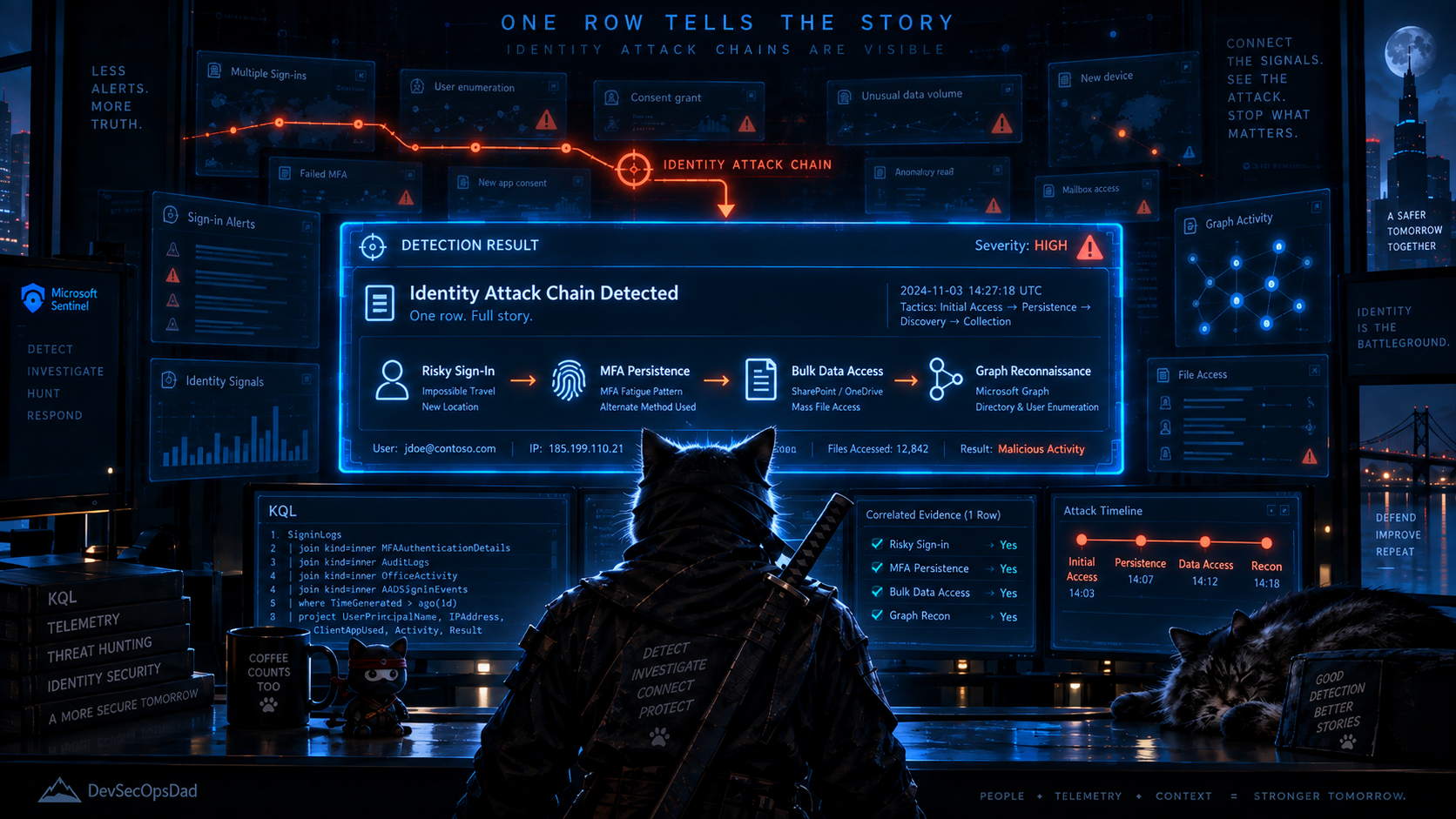
The lines that do the work
Two structural moves, and the verdict that sits on top of them.
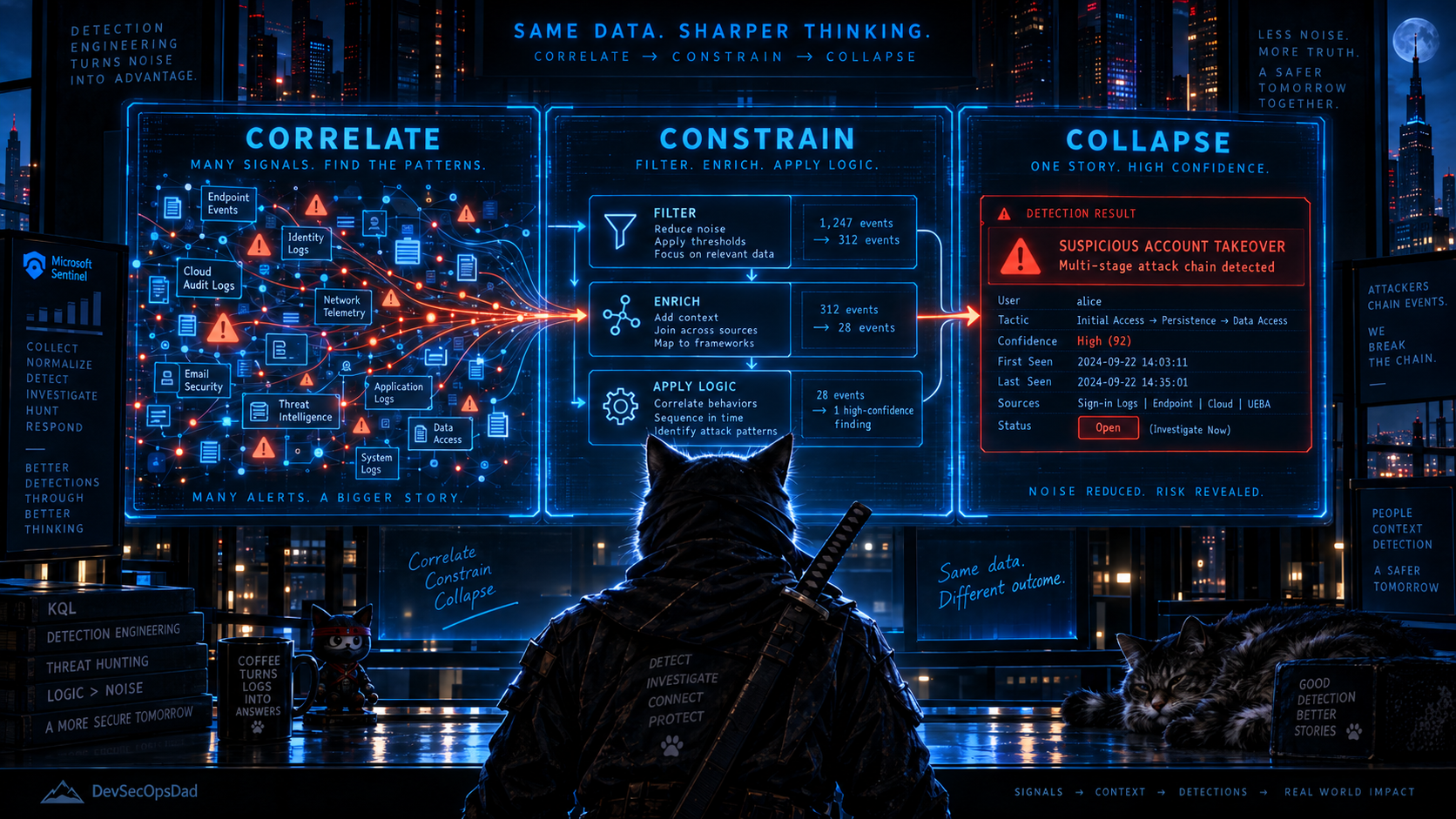
The first is the three Correlated* CTEs. Each one joins a raw stage to the anchor sign-in, applies the time-window constraint, and then collapses to one row per identity. CorrelatedMFA uses arg_min(MFATime, MFAOperation, MFARegistrationIP) so the timestamp, operation, and IP in the output describe one coherent event — not three fields cherry-picked from three different events by independent aggregations. The ordering matters: correlate → constrain → collapse ensures the query never selects an event it will later reject. Pre-aggregating first — running min(MFATime) across the whole lookback before knowing which sign-in to correlate against — can pick yesterday’s legitimate MFA change instead of today’s attacker registration. The time filter then rejects the row, and because a non-null row was joined and rejected (rather than never matched), the identity vanishes from the output instead of falling back to a lower chain score. The intermediate CTEs prevent that by constraining the time window while every candidate event is still visible.
The second is the DAG-aware verdict. The source reporting describes bulk data access and Graph reconnaissance as downstream activities associated with the persisted compromise, not sequential stages. The case statement preserves that shape: an identity with persistence plus Graph recon but no bulk download is PersistenceAndRecon, not PersistenceOnly. ChainScore counts how many post-persistence branches fired. The analyst sorts by ChainScore desc and sees the most advanced chains first — without misrepresenting a recon-only chain as having less progression than it did.
The output row for a FullChain identity shows — on one line — the risky sign-in time and IP, the MFA registration operation and IP, the bulk-access count and workloads, and the Graph API apps and IPs. That is the same shape as last week’s DecodedTagAscii column: show the analyst what happened, what it meant, and how far it went, on a single row.
Validate before you deploy
The composite query touches three tables (SigninLogs, AuditLogs, OfficeActivity) and two licensing prerequisites. This check confirms all three are populated and both prerequisites are present, before you schedule anything.
// Are all three tables populated, and does SigninLogs carry
// RiskLevelDuringSignIn (Entra ID P2 prerequisite)?
union
  (SigninLogs
   | where TimeGenerated >= ago(7d)
   | summarize Rows = count(),
               RiskRows = countif(RiskLevelDuringSignIn in
                   ('high', 'medium', 'low', 'none'))
     by Source = "SigninLogs"),
  (AuditLogs
   | where TimeGenerated >= ago(7d)
   | summarize Rows = count(),
               MFARegRows = countif(OperationName has "security info")
     by Source = "AuditLogs"),
  (OfficeActivity
   | where TimeGenerated >= ago(7d)
   | where OfficeWorkload in ('SharePoint', 'OneDrive', 'Exchange')
   | summarize Rows = count(),
               FileOps = countif(Operation in
                   ('FileDownloaded', 'FileAccessed',
                    'FileSyncDownloadedFull'))
     by Source = "OfficeActivity")
| order by Source asc
If RiskRows is zero, Entra ID P2 Identity Protection isn’t active and the risky sign-in anchor produces no results — the entire chain is blind. If MFARegRows is zero, AuditLogs isn’t streaming MFA registration events (check Entra ID diagnostic settings). If OfficeActivity has zero FileOps, the OfficeActivity connector is either absent or the workload isn’t configured. All three must be nonzero for the composite query to work.
Keeping it honest
- The
Correlated*CTEs usearg_minandarg_maxafter the time constraint, which is load-bearing.arg_min(MFATime, MFAOperation, MFARegistrationIP)returns all three columns from the same event — the earliest qualifying MFA registration. Separatemin()/take_any()calls across the same summarize can return the timestamp from one event and the operation from another. For triage, the fields in a single output row should describe a single event, not a composite. The same applies toarg_max(AccessCount, ...)inCorrelatedBulk. RiskySignInsusesarg_maxto choose one sign-in per UPN, which is arbitrary among ties. If a user has two'high'sign-ins in the lookback, the one chosen as the anchor is nondeterministic. Downstream time windows depend onSignInTime, so a different choice could include or exclude a downstream event. For the typical case — one compromise event per UPN in a 2-day window — this doesn’t matter. For the edge case of two distinct attacks against the same identity, the analyst should check both sign-in times inSigninLogsduring triage. The alternative — evaluating every sign-in as a separate chain anchor — would make the query substantially more complex for a case the analyst resolves by inspecting the output row.leftouterjoins produce null columns for unmatched stages, and those nulls are load-bearing. Theisnotempty()checks in theHasPersistence/HasBulkAccess/HasGraphReconflags depend on unmatched stages producing null, not empty string. Validate null behavior in your workspace before scheduling.- The Graph API stage uses
ResourceDisplayName =~ 'Microsoft Graph', which is a display name, not a resource ID. Display names can be localised or overridden. If you need the resource identifier to be stable across tenants, match onResourceId(00000003-0000-0000-c000-000000000000) instead. - Bulk access and Graph recon are constrained to explicit windows after the sign-in (2 hours and 24 hours respectively), not merely “after.” These match the source queries’ own correlation windows. If your environment sees slower attacker dwell times, widen them — but leaving them unbounded against a 2-day lookback would let Monday’s sign-in correlate with Tuesday afternoon’s normal activity. The timestamps are in the output, so the analyst can verify the sequence during triage. Adding
where EarliestAccess > MFATimetoCorrelatedBulkis a one-line tightening if your environment warrants it. - Entra ID P2 is required. Without it,
RiskLevelDuringSignInis never populated and the anchor produces zero rows. The composite query omits theResultTypefallback the source queries used, because that fires on any non-successful sign-in and would flood the chain with false-positive anchors. If you don’t have P2, use the individual stage queries instead. - The bulk-access threshold of 50 operations per 30-minute bin is a starting position. Lower it for low-and-slow exfiltration; raise it if sync clients generate noise. The threshold only gates the bulk-access branch; persistence and Graph recon are unaffected.
🥈 Act II: The IP That Wasn’t There
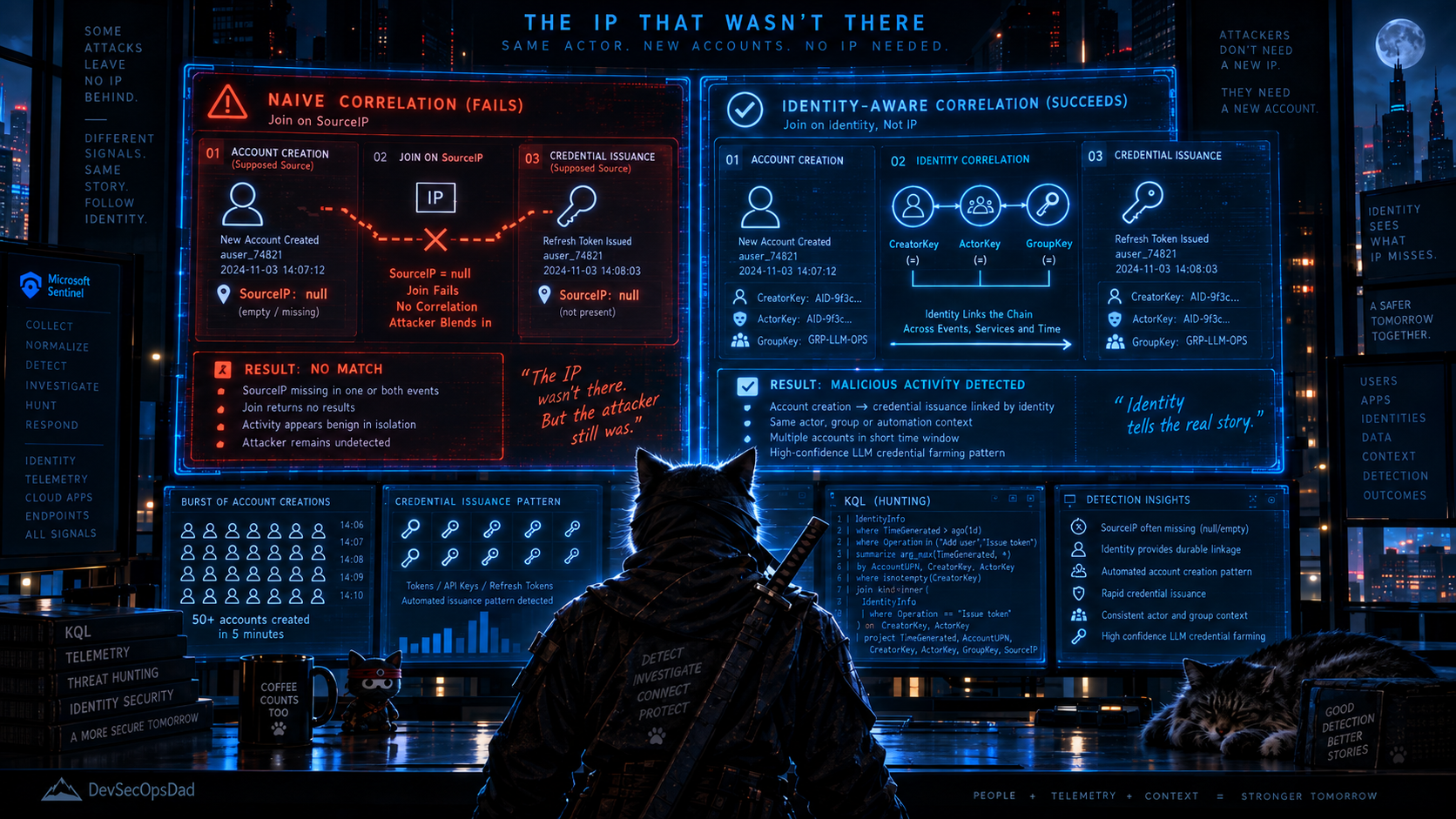
Sunday’s Detection 5 is the most novel detection concept the pipeline produced all week: bulk account creation followed by rapid API key generation, consistent with LLM credential farming. The intelligence source — SANS ISC’s reporting on a self-expanding stolen inference supply chain — describes an attacker operation that creates accounts through web application flaws, immediately provisions API keys on each one, and then aggregates the stolen access behind an attacker-controlled gateway to resell LLM inference. The detection shape is exactly right: a burst of account creations from one IP, followed within an hour by credential-issuance events on those same accounts. The concept is genuinely useful and worth deploying. The query has two structural problems that will silently produce no results in most tenants.
let accountCreations = AuditLogs
| where OperationName has_any ("Add user", "Create user",
                                "Invite external user")
| where Result == "success"
| extend SourceIP = coalesce(
    tostring(InitiatedBy.user.ipAddress),
    tostring(InitiatedBy.app.ipAddress)
  )
| extend CreatedUser = tostring(TargetResources[0].userPrincipalName)
| where isnotempty(SourceIP) and isnotempty(CreatedUser)
| project CreationTime = TimeGenerated, SourceIP, CreatedUser;
let apiKeyEvents = AuditLogs
| where OperationName has_any (
    "Add service principal credentials",
    "Update application",
    "Add application",
    "Add OAuth2PermissionGrant"
  )
| where Result == "success"
| extend ActorUPN = tostring(InitiatedBy.user.userPrincipalName)
| where isnotempty(ActorUPN)
| project KeyTime = TimeGenerated, ActorUPN, ApiKeyOperationName = OperationName;
Problem one: the SourceIP extraction. The brief’s own caveats flag this openly — InitiatedBy.user.ipAddress and InitiatedBy.app.ipAddress are the correct fields for user-initiated and app-initiated events respectively, and the coalesce is the right shape. But the where isnotempty(SourceIP) filter means that if both fields are null — which they routinely are for service-principal-initiated bulk operations, which is exactly the kind of operation an automated farming tool would use — the entire event is dropped. For the specific attack described in the SANS reporting, where accounts are created through web application flaws rather than through interactive sessions, the initiating identity is likely a service principal or an application context, not a signed-in user. InitiatedBy.app.ipAddress is populated inconsistently for these; in many tenants, it’s null. The brief flagged the risk; the filter turns the risk into a guaranteed miss.
Problem two: the join on CreatedUser == ActorUPN. This assumes the newly created account immediately performs the API key operation under its own identity. That’s the right model for a farming operation where the attacker creates a user, logs in as that user, and generates an API key — but it’s not the only model. If the attacker creates the account AND provisions the credentials from the same privileged session (using the initial compromised identity or service principal to do both), the actor on the credential-issuance event is the creating identity, not the created one. The join produces no results because the UPN that created the account is not the UPN that was created.
The KQL
let lookback = 1d;
let creationWindow  = 30m;
let keyIssuanceWindow = 1h;
let bulkThreshold   = 3;
// ============================================================
// STAGE A: ACCOUNT CREATIONS.
//
// SourceIP pulled from InitiatedBy — user path first, app
// path as fallback. But instead of filtering out events where
// both are null, carry the creating actor identity forward.
// The join below needs the creator, not the IP, as the link.
// ============================================================
let AccountCreations =
    AuditLogs
    | where TimeGenerated > ago(lookback)
    | where OperationName has_any (
          "Add user", "Create user", "Invite external user")
    | where ResultDescription =~ "success"
          or Result =~ "success"
    | extend CreatorKey = tolower(coalesce(
          tostring(InitiatedBy.user.userPrincipalName),
          tostring(InitiatedBy.app.displayName)))
    | extend SourceIP = coalesce(
          tostring(InitiatedBy.user.ipAddress),
          tostring(InitiatedBy.app.ipAddress))
    | extend CreatedUser = tolower(
          tostring(TargetResources[0].userPrincipalName))
    | where isnotempty(CreatedUser)
    // GroupKey must match BulkCreators: IP when present,
    // CreatorKey when not. Without this, the join on
    // SourceIP == GroupKey silently misses the IP-absent
    // case — which is the exact scenario the fix is for.
    | extend GroupKey = iff(isnotempty(SourceIP), SourceIP,
                            CreatorKey)
    | extend CreationBucket = bin(TimeGenerated, creationWindow)
    | project
        CreationTime = TimeGenerated,
        CreatorKey,
        SourceIP,
        CreatedUser,
        GroupKey,
        CreationBucket;
// ============================================================
// STAGE B: CREDENTIAL ISSUANCE EVENTS.
//
// Two join paths: one where the CREATED account acts under
// its own UPN (the farming model), one where the CREATOR
// account provisions the credential on the new account's
// behalf (the privileged-session model). Both are valid; the
// source query only covered the first.
// ============================================================
let CredentialEvents =
    AuditLogs
    | where TimeGenerated > ago(lookback)
    | where OperationName has_any (
          "Add service principal credentials",
          "Update application",
          "Add application",
          "Add OAuth2PermissionGrant")
    | where ResultDescription =~ "success"
          or Result =~ "success"
    // Normalize to ActorKey — same shape as CreatorKey so the
    // join covers user-initiated AND app-initiated credential
    // operations. Without this, a service principal that both
    // creates accounts and provisions credentials is invisible
    // on this side of the join.
    | extend ActorKey = tolower(coalesce(
          tostring(InitiatedBy.user.userPrincipalName),
          tostring(InitiatedBy.app.displayName)))
    | extend TargetApp = tostring(TargetResources[0].displayName)
    | where isnotempty(ActorKey)
    | project
        KeyTime = TimeGenerated,
        ActorKey,
        CredentialOp = OperationName,
        TargetApp;
// ============================================================
// BULK CREATORS — same IP creating N+ accounts in a window.
// SourceIP may be empty; fall back to CreatorKey for grouping
// so the query still produces results when IP is absent.
// ============================================================
let BulkCreators =
    AccountCreations
    // GroupKey and CreationBucket already computed above.
    | summarize
        AccountsCreated = dcount(CreatedUser),
        CreatedUsers    = make_set(CreatedUser, 50)
      by GroupKey, CreationBucket
    | where AccountsCreated >= bulkThreshold;
// ============================================================
// THE JOIN — two paths.
//
// Path 1: created account == credential actor (farming).
// Path 2: creator account == credential actor (privileged).
// Union both and deduplicate.
// ============================================================
let FarmingPath =
    AccountCreations
    | join kind=inner BulkCreators on GroupKey, CreationBucket
    | join kind=inner CredentialEvents
        on $left.CreatedUser == $right.ActorKey
    | where KeyTime between
        (CreationTime .. (CreationTime + keyIssuanceWindow))
    | extend JoinPath = "CreatedUserActed";
let PrivilegedPath =
    AccountCreations
    | join kind=inner BulkCreators on GroupKey, CreationBucket
    | join kind=inner CredentialEvents
        on $left.CreatorKey == $right.ActorKey
    | where KeyTime between
        (CreationTime .. (CreationTime + keyIssuanceWindow))
    | extend JoinPath = "CreatorActed";
union FarmingPath, PrivilegedPath
| summarize
    JoinPaths     = make_set(JoinPath),
    KeyTimes      = make_set(KeyTime, 20),
    CredentialOps = make_set(CredentialOp, 20),
    TargetApps    = make_set(TargetApp, 20)
  by CreationTime, CreatorKey, SourceIP, CreatedUser,
     AccountsCreated
| project
    CreationTime, CreatorKey, SourceIP, CreatedUser,
    AccountsCreated, JoinPaths, KeyTimes,
    CredentialOps, TargetApps
| order by CreationTime desc
Keeping it honest
- The
Resultfield in AuditLogs is inconsistently named. Some tenants useResult, others useResultDescription, and the string value is sometimes'success'and sometimes'Success'. The query checks both field names with=~(case-insensitive). RunAuditLogs | summarize count() by Result | take 20in your workspace to confirm which applies. InitiatedBy.app.displayNameis a fallback, not a stable identifier. When SourceIP is absent and the creating actor is an application, theCreatorKeyfalls back to the app’s display name. Display names are mutable and non-unique; if you need stable application identity, useInitiatedBy.app.appIdinstead. It’s an app ID rather than a UPN, but as a grouping key it’s more reliable than a display name.- The BulkCreators grouping falls back to CreatorKey when SourceIP is absent. This means a single service principal creating accounts from multiple IPs (or no IP) still gets grouped — which is correct for the farming pattern but could also match a legitimate provisioning pipeline. Baseline against your identity governance system before scheduling.
- The farming path and the privileged path can both match the same event. The
unionandsummarizededuplicate, andJoinPathsin the output tells the analyst which path(s) matched. Both matching is not a false positive — it means the created account AND the creating account both performed credential operations, which is a stronger signal than either alone.
🎖 Honorable Mention: Eighteen Lines Where Two Would Do
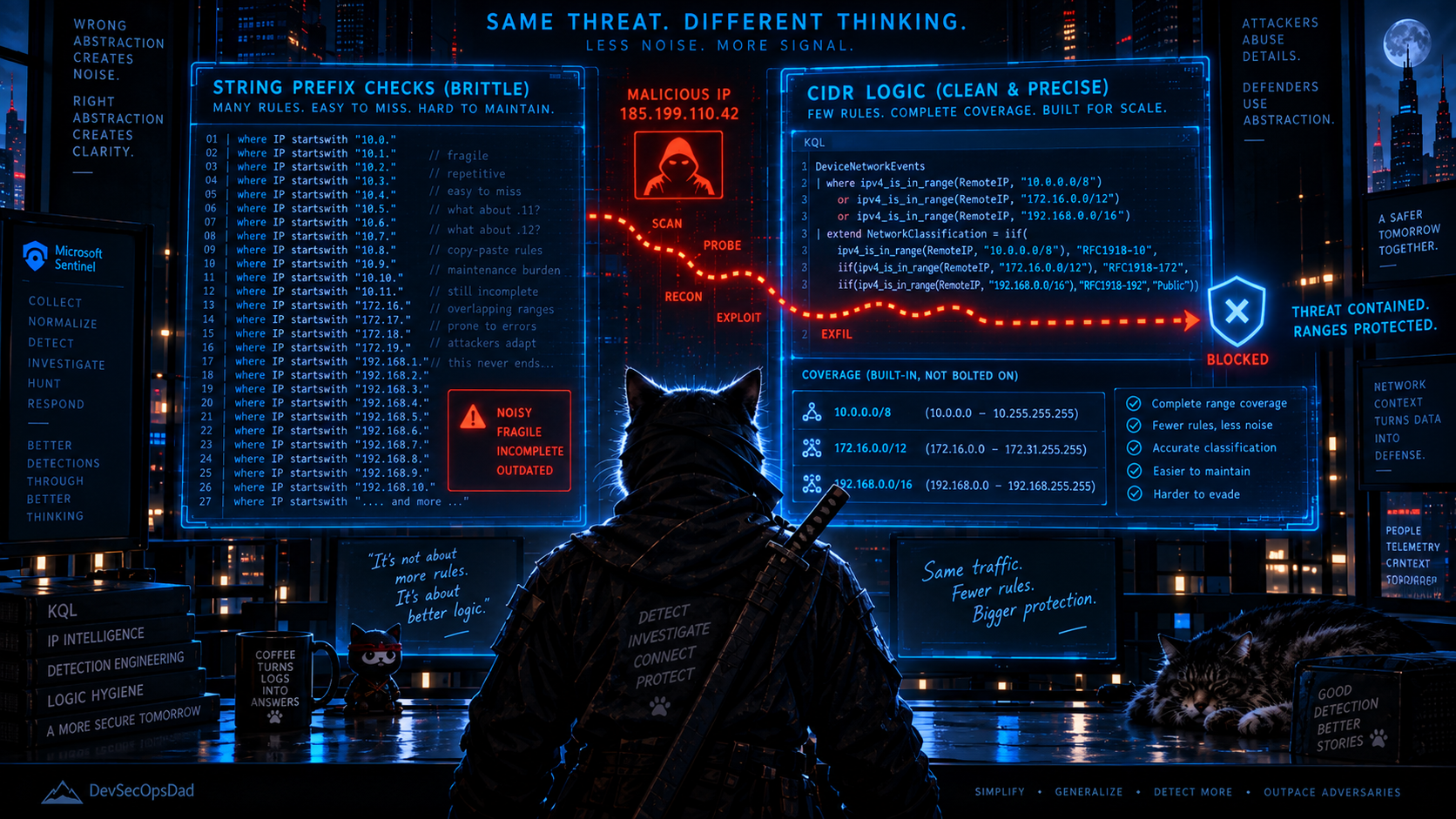
Saturday’s Detection 3 targets Metasploit scanner reconnaissance against Apache Tika endpoints and needs to filter out internal traffic. The pipeline wrote this:
| where SourceIP !startswith "10."
    and SourceIP !startswith "172.16."
    and SourceIP !startswith "172.17."
    and SourceIP !startswith "172.18."
    and SourceIP !startswith "172.19."
    and SourceIP !startswith "172.20."
    and SourceIP !startswith "172.21."
    and SourceIP !startswith "172.22."
    and SourceIP !startswith "172.23."
    and SourceIP !startswith "172.24."
    and SourceIP !startswith "172.25."
    and SourceIP !startswith "172.26."
    and SourceIP !startswith "172.27."
    and SourceIP !startswith "172.28."
    and SourceIP !startswith "172.29."
    and SourceIP !startswith "172.30."
    and SourceIP !startswith "172.31."
    and SourceIP !startswith "192.168."
    and SourceIP !startswith "127."
KQL has a structural abstraction for this. You might reach for ipv4_is_private() — but that function covers only the three RFC1918 ranges (10/8, 172.16/12, 192.168/16). It does not cover loopback, link-local, or the zero network — Microsoft’s own docs show ipv4_is_private("127.0.0.1") == false. The original query’s eighteen lines actually do exclude loopback (the 127. prefix), which a naïve ipv4_is_private() replacement would lose.
The right function is ipv4_is_in_any_range(), which takes an explicit list of CIDRs:
let NonRoutableRanges = dynamic([
    "10.0.0.0/8",
    "172.16.0.0/12",
    "192.168.0.0/16",
    "127.0.0.0/8",
    "169.254.0.0/16",
    "0.0.0.0/8"
]);
// ...
| where not(ipv4_is_in_any_range(SourceIP, NonRoutableRanges))
Two lines instead of eighteen. The CIDR list is explicit, auditable, and extensible — adding link-local coverage (which the original enumeration missed entirely) is one array element, not another !startswith line. And the function parses the IP as an address and evaluates CIDR membership, rather than doing string-prefix comparison on what is conceptually a network-range check.
This is the same shape as the last two weeks: an enumeration of specific values where a structural operator exists. Week one was string comparison where a semantic function existed. Week two was character enumeration where a codepoint range existed. This week is CIDR enumeration where a classification function exists. The underlying pattern is the same every time — the query author thought in terms of “list the values I know about” when the engine thinks in terms of “describe the property I care about.” The values can be incomplete; the property cannot.
🥊 Bonus Round: max('high', 'medium') Returns 'medium'
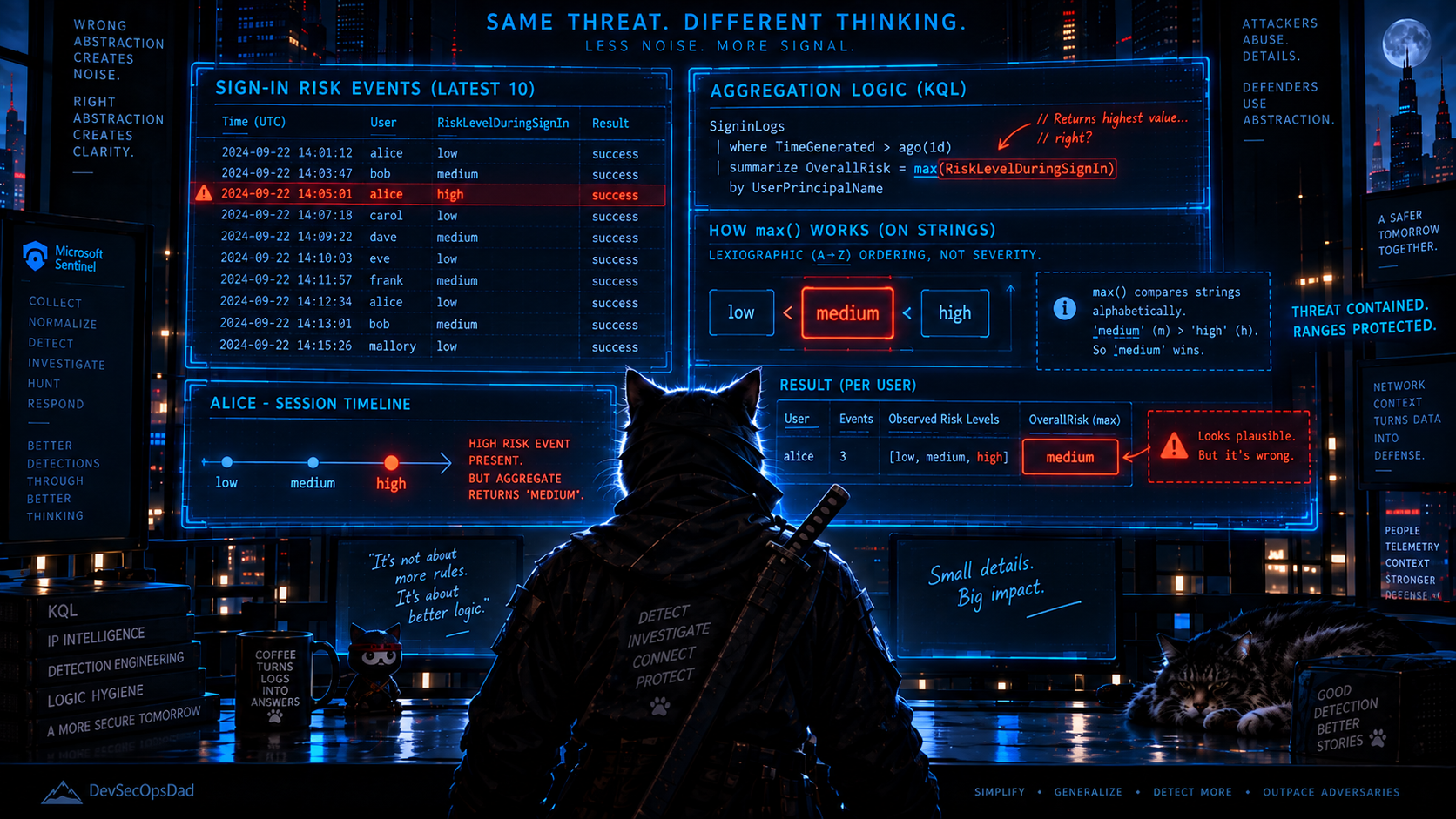
I want to name explicitly the KQL mechanic that is quietly present in both Thursday and Friday’s source queries, because it looks like an aggregation and behaves like a bug.
Thursday’s Detection 1:
| summarize
    SignInTime = max(TimeGenerated),
    RiskLevel = max(RiskLevelDuringSignIn),
    SignInIP = max(IPAddress)
    by UserPrincipalName
Thursday’s Detection 2:
| summarize
    SignInTime = max(TimeGenerated),
    SignInIP = max(IPAddress),
    RiskLevelDuringSignIn = max(RiskLevelDuringSignIn)
    by UserPrincipalName
Both use max(RiskLevelDuringSignIn) to pick “the worst risk level” for a user who had multiple risky sign-ins. The intention is clear: if a user had one 'medium' sign-in and one 'high' sign-in, report 'high'. What max() actually does on strings is return the lexicographic maximum — the value that sorts last in dictionary order. And in dictionary order, 'h' (Unicode 0x68) comes before 'm' (Unicode 0x6D), which means:
max('high', 'medium') → 'medium'
The analyst sees RiskLevel = medium in the output when the actual highest-severity event was high. The query ran without error, the output looked plausible (a risk level string that came from the data), and it was wrong.
Both queries pre-filter to RiskLevelDuringSignIn in ('high', 'medium'), so 'none' and 'low' are already excluded — but between the two values that remain, max() returns the less severe one. The same issue applies to max(IPAddress) in both queries: it returns the lexicographically largest IP string, which is not “the most recent IP” or “the riskiest IP” or anything else meaningful — 9.9.9.9 beats 200.100.50.1 because '9' > '2' in character comparison.
The fix is in Act I’s query above: convert the risk level to an ordinal and use arg_max to pick the row with the highest ordinal, which carries the correct IP and timestamp along with it:
| extend RiskOrdinal = case(
      RiskLevelDuringSignIn == "high",   2,
      RiskLevelDuringSignIn == "medium", 1,
                                         0)
| summarize arg_max(RiskOrdinal, TimeGenerated, IPAddress,
                     RiskLevelDuringSignIn, ...)
           by UserPrincipalName
arg_max(RiskOrdinal, ...) returns the row where RiskOrdinal is highest, and carries all the other columns from that row. The analyst gets the highest-severity sign-in’s risk level, timestamp, and IP — all from the same event, not each independently maximized. If there are multiple 'high' sign-ins, arg_max picks one of them (the selection among ties is nondeterministic), which is correct — any 'high' event is the right anchor.
The general rule: max() and min() on strings do not mean “most severe” and “least severe” — they mean “sorts last” and “sorts first.” Any time you’re aggregating a string with an ordinal meaning (severity levels, priority labels, status values that progress through a lifecycle), convert to a numeric ordinal first, aggregate the ordinal, and — if you need the other columns from the same row — use arg_max or arg_min instead of separate max() calls on each column. Separate max() calls on each column can give you the risk level from one event and the IP from a different event, which is an aggregation artefact, not a finding.
🪡 The Common Thread
Last week the pattern was representation mismatch: a character enumeration where a codepoint range existed, a port filter where a behavioural signature was needed. This week it is scope mismatch: a stage detection where a chain detection was needed, a SourceIP extraction that dropped the events it was written to find, an IP enumeration where a classification function existed, and an aggregation function that returned the wrong severity because it doesn’t know what severity means.
Every one of the six passkey-themed detections is a correct answer to a question one level below the one the analyst actually has. “Did this user register MFA after a risky sign-in?” is a yes/no. “How many branches of the identity attack chain did this user reach?” is a severity. The answer to the first question is useful; the answer to the second is actionable. And the second answer costs three leftouter joins and a handful of boolean flags on top of the same underlying tables — the difference in query complexity is small, and the difference in triage value is the difference between three independent alerts and one row that tells the whole story. The structural lesson underneath is narrower and worth naming: correlate → constrain → collapse, in that order. Pre-aggregating a stage before correlating it with the anchor selects the wrong event when legitimate activity precedes the attack, and the time filter then silently drops the identity instead of reporting it at a lower chain score.
The LLM credential farming detection is the same pattern from a different angle. The concept is genuinely novel — detecting bulk account creation followed by rapid credential issuance is a real and emerging pattern, and the pipeline is the first place I’ve seen it turned into a deployable query. The fix is not to the concept but to the plumbing: the SourceIP extraction that filtered out the events it was written for, and the join that assumed one model of attacker behaviour when two models exist. The concept survived; the implementation needed two structural changes.
And the bonus round is the same lesson as the last two weeks, one layer lower. make_list() doesn’t preserve order. max() on strings doesn’t mean “most severe.” Both run without error, both produce plausible output, and both mean something different from what the author intended. The common shape is a function that does what the documentation says and doesn’t do what the variable name implies — and the variable name is what the analyst reads.
Every one of these came straight out of this week’s daily briefs — each detection shipped with ATT&CK mappings, telemetry requirements, deployment gates, triage runbooks, false-positive notes, and an honest readiness call. Thirty-two this week across seven days, and the ones worth writing about were the ones that still needed a human between the automation and the analyst — which is exactly what this weekly review is for.
This kind of detection content is published daily — fresh threat intel translated straight into deployable detections, so you spend your time tuning and shipping instead of reading and re-deriving — that’s the whole point of the Daily Detection Engineering Brief at DevSecOpsDadAttack.com.
Helpful Links and References:
This Week’s Detection Engineering Briefs:
- Monday, 7th September
- Tuesday, 8th September
- Wednesday, 9th September
- Thursday, 10th September
- Friday, 11th September
- Saturday, 12th September
- Sunday, 13th September
DevSecOpsDadAttack Tags:
- detection-engineering
- kql
- Passkey Social Engineering
- Identity Attack Chain
- MFA Persistence
- Microsoft Graph
- SharePoint
- OneDrive
- Exchange Online
- Entra ID
- LLM Credential Farming
- Apache Tika
- Metasploit
- SigninLogs
- AuditLogs
- OfficeActivity
- CommonSecurityLog
- Microsoft Sentinel
- Defender XDR
- T1098
- T1098.001
- T1087
- T1087.004
- T1136
- T1213
- T1213.002
ATT&CK Coverage in This Article:
Detected by the queries above:
- T1098 / T1098.001 — Account Manipulation / Additional Cloud Credentials (Act I. The MFA registration following a risky sign-in is the persistence mechanism the campaign uses to survive password resets. The composite query’s
HasPersistenceflag andPersistenceOnlyminimum verdict start here.) - T1213 / T1213.002 — Data from Information Repositories / SharePoint (Act I. Bulk download from SharePoint, OneDrive, and Exchange at volume is the exfiltration precursor the reporting names.)
- T1087 / T1087.004 — Account Discovery / Cloud Account (Act I. Graph API enumeration of users, groups, directory objects, and service principals is the reconnaissance technique.)
- T1136 — Create Account (Act II. Bulk account creation is the entry point for the LLM credential farming chain.)
- T1098 — Account Manipulation (Act II. Rapid API key or credential issuance on newly created accounts is the credential-provisioning stage of the farming operation.)
Present in the activity, not cleanly mappable:
- Passkey-themed phishing lure. ATT&CK T1566.002 (Phishing: Spearphishing Link) covers the lure, but the passkey-specific variant — “enroll your new security key” — is a social engineering technique that sits upstream of the detection chain. The composite query starts at the risky sign-in, after the lure has already succeeded.
Deliberately unmapped:
- The bonus round.
max()on strings is a KQL aggregation mechanic, not adversary behaviour. It is in the article because it changes what the Act I source queries actually report, not because it maps to anything in ATT&CK. - The honorable mention.
ipv4_is_in_any_range()vs. manual!startswithis a query hygiene issue that affects coverage, not a technique the adversary employed.
References:
- Microsoft Security Blog. Passkey-themed social engineering leads to identity and cloud compromise. https://www.microsoft.com/en-us/security/blog/2026/09/09/passkey-themed-social-engineering-leads-identity-cloud-compromise/
- SANS ISC. The Self-Expanding Stolen Inference Supply Chain: An AI Agent Harvesting and Re-Serving LLM Access. https://isc.sans.edu/diary/rss/33332
- Microsoft Learn. SigninLogs table in Microsoft Sentinel. https://learn.microsoft.com/en-us/azure/azure-monitor/reference/tables/signinlogs
- Microsoft Learn. AuditLogs table in Microsoft Sentinel. https://learn.microsoft.com/en-us/azure/azure-monitor/reference/tables/auditlogs
- Microsoft Learn. OfficeActivity table in Microsoft Sentinel. https://learn.microsoft.com/en-us/azure/azure-monitor/reference/tables/officeactivity
- Microsoft Learn. arg_max() aggregation function. https://learn.microsoft.com/en-us/kusto/query/arg-max-aggregation-function
- Microsoft Learn. ipv4_is_private() function. https://learn.microsoft.com/en-us/kusto/query/ipv4-is-private-function
- Microsoft Learn. ipv4_is_in_any_range() function. https://learn.microsoft.com/en-us/kusto/query/ipv4-is-in-any-range-function
- Microsoft Learn. case() function. https://learn.microsoft.com/en-us/kusto/query/case-function
- MITRE ATT&CK. Account Manipulation (T1098). https://attack.mitre.org/techniques/T1098/
- MITRE ATT&CK. Additional Cloud Credentials (T1098.001). https://attack.mitre.org/techniques/T1098/001/
- MITRE ATT&CK. Account Discovery (T1087). https://attack.mitre.org/techniques/T1087/
- MITRE ATT&CK. Cloud Account (T1087.004). https://attack.mitre.org/techniques/T1087/004/
- MITRE ATT&CK. Data from Information Repositories (T1213). https://attack.mitre.org/techniques/T1213/
- MITRE ATT&CK. SharePoint (T1213.002). https://attack.mitre.org/techniques/T1213/002/
- MITRE ATT&CK. Create Account (T1136). https://attack.mitre.org/techniques/T1136/
- DevSecOpsDad.com. From RSS Noise to CISO Signal: Automating Cyber Threat Intel. https://www.hanley.cloud/2026-04-28-From-RSS-Noise-to-CISO-Signal-Automating-Cyber-Threat-Intelligence-That-Actually-Matters/
- DevSecOpsDad.com. Last Week: The Character Is Not the Payload. https://www.hanley.cloud/2026-09-08-KQL-Detection-of-the-Week-The-Character-Is-Not-The-Payload/
Stay Ahead of Emerging Threats
Looking for actionable threat intelligence and detection engineering insights?
DevSecOpsDadAttack publishes daily:
📈 Threat Intelligence Briefs focused on active campaigns, exploitation trends, and operational risk
🛠️ Detection Engineering Briefs with ATT&CK mappings, telemetry requirements, KQL detections, tuning guidance, and triage workflows
🔍 Practical analysis designed for SOC teams, threat hunters, detection engineers, and security leaders
Visit DevSecOpsDadAttack.com for the latest intelligence and detection content.
📚 Want to go deeper?
Anyone can aggregate threat intel. Very few teams can prove why they acted—or why they didn’t.
The below books are about closing that gap; turning curated signal into defensible decisions across KQL, PowerShell, and the Microsoft security stack.
🛠️ KQL Toolbox: Turning Logs into Decisions in Microsoft Sentinel
🧰 PowerShell Toolbox: Hands-On Automation for Auditing and Defense

📖 Ultimate Microsoft XDR for Full Spectrum Cyber Defense
Real-world detections, Sentinel, Defender XDR, and Entra ID — end to end.
